The delivery mechanism for historical data is very similar to the real time data: a unique identifier is provided as part of the reqHistoricalData request in order to identify the incoming data via the historicalData callback from the EWrapper interface. From now on, you can assume that every method requiring a unique identifier as part of its parameters will work the same way.
Historical data is delivered in the form of candlesticks indicated by high, low, open and close prices. Some indicators provide extra information such as volume in the case of TRADES. It is important to observe the historical data limitations when making historical data requests to avoid a pacing violation.
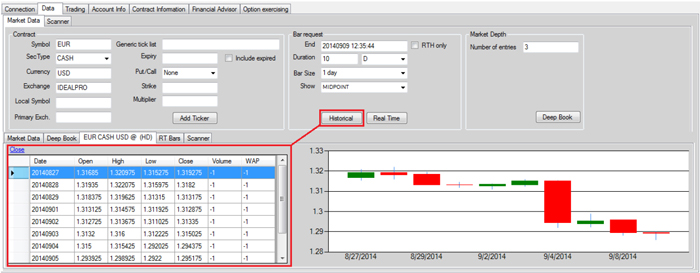
Using IBSampleApp, you request historical data using the Bar Request section of the Market Data tab. Once again, you fill in the fields and then click the Historical button. The output is displayed in a grid as shown below.
The API does not provide any graphic capabilities. The chart is part of the sample application to allow for better visualization of the incoming data.